All research postgraduate (RPg) students and taught doctoral students admitted in 2025/26 or thereafter should submit a DMP.
PhD and taught doctoral students (excluding Doctor of Nursing students) must submit a DMP prior to completing the candidacy fulfillment process. The Thesis Supervisor and the Head of Graduate Division will confirm the DMP completion when they sign off the document “Notification of Fulfilment of Candidacy Requirements” for individual students.
M.Phil. and Doctor of Nursing students are expected to complete their DMP submission within the first year of study. Compliance will be checked during the graduation assessment.
Upon submission of the final version of their thesis/portfolio, students are required to share their finalized DMP via the DMPTool platform, unless an embargo has been granted. In alignment with the policy on thesis/portfolio confidentiality, students may choose from two data-sharing options: (1) Two-year restricted access (automatically applied and aligned with that of the thesis embargo period). (2) Immediate release.
A friendly FYI: Click the embedded images below to view them in full size.
1. Students will create their DMP using the CUHK DMP template on the DMPTool platform. Under the Finalize tab in DMPTool, they must set plan visibility to Private.
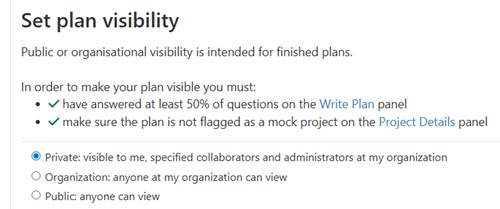
2. Students should track their progress in the "Write Plan" panel by calculating the percentage of completed questions (i.e., number of questions answered divided by the total number of questions). If the completion rate exceeds 80%, the DMP content will be considered substantial.
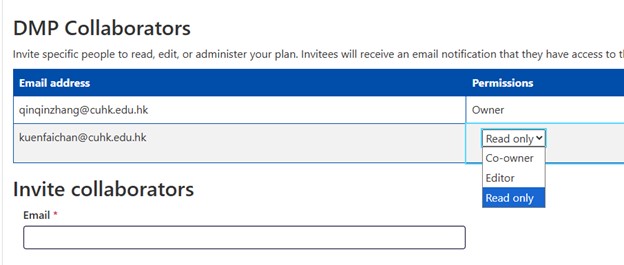
3. Students will add their Thesis Supervisor as a collaborator on their DMP under the Collaborators tab on the DMPTool platform. They may assign one of three permission levels to their Thesis Supervisor: Read Only, Editor, or Co-owner. See screenshot below. Please refer to the descriptions below for detailed privileges associated with each role assigned to collaborators. Once added, the Thesis Supervisor will be able to access and view the DMP by logging into the DMPTool platform with their user account.
4. Students will consult their Thesis Supervisor to select a scheduling option for sharing their finalized DMP with the CUHK community. They will specify the selection in the form “Submission of Final Version of Thesis for Archive/Publication”.
5. Upon submission of the final version of thesis/portfolio, students are expected to share their finalized DMP through the DMPTool platform. If no embargo is applied, students should set the visibility setting to Organization, allowing access to the DMP by members of the CUHK community with DMPTool accounts. If an embargo period is applied (i.e. two years from the date of submission of the final version of thesis/portfolio), the plan’s visibility setting should remain Private. Once the embargo expires, the Library will update the visibility to Organization.

Note: Graduates who wish to request an extension of the embargo on their DMP must submit the request at least one month before the original embargo period ends. If the extension is approved, the plan’s visibility will remain set to Private, and the DMPTool administrator will update it to Organization once the extended embargo expires, on behalf of the graduate. (Please note that students lose access to DMPTool once they graduate from CUHK.) If the extension is not approved, the DMPTool administrator will change the plan’s visibility to Organization as originally scheduled.
All RPgs and taught doctoral students admitted in 2025/26 or thereafter are strongly encouraged to preserve their research data, and wherever possible, share it in the CUHK Research Data Repository (RDR) or another trusted open data repository that provides a valid Digital Object Identifier (DOI) or another form of permanent identifier. Research data being shared should fulfill the following criteria:
Students are strongly encouraged to deposit their datasets in the CUHK RDR. Alternatively, they may choose an open data repository that meets the TRUST principles: Transparency, Responsibility, User focus, Sustainability, and Technology. Below is a list of recommended general-purpose data repositories suitable for students to share their datasets. Additionally, students may explore re3data.org (Registry of Research Data Repositories) to identify a suitable 'domain-specific' home for their datasets.
If a student intends to make his/her dataset(s) public, s/he should provide the DOI or permanent identifier for the dataset(s) in the returned form “Submission of Final Version of Thesis for Archive/Publication”.
Students are responsible for setting or updating the embargo period for their data in the selected data repository. Students are also responsible for ensuring that their embargoed data will be made publicly available once the embargo period expires.
A friendly FYI: Click the embedded images below to view them in full size.
1. Students are strongly encouraged to preserve their research data throughout the entire lifecycle—from its initial creation during the planning stage, through collection and analysis, to on-going updates as their projects evolve. Students will discuss with their Thesis Supervisor to determine the appropriate data to be deposited in a data repository.
To this end, students should deposit the appropriate datasets in unpublished mode either in the CUHK RDR or another trusted open data repository (Refer to #1 in the Notes section below). For criteria assessing the suitability of data for publication, please refer to the guidelines provided above (the first paragraph under Part 2).
2. Students will share the Private URL of their unpublished dataset with their Thesis Supervisor to facilitate review of the dataset. To ensure content security, students may choose to encrypt the email containing the Private URL.
3. Upon submission of the final version of their thesis/portfolio, students will consult their Thesis Supervisor to determine an appropriate schedule for sharing their data in the selected data repository based on the sensitivity and confidentiality of the data. Students should provide the DOI or permanent identifier for their dataset in the form “Submission of Final Version of Thesis for Archive/Publication”—if they intend to make their datasets public.
4. Students are responsible for setting the embargo period for individual files in the selected data repository by specifying an embargo end-date (Refer to #3 in the Notes section below).

(1) In the CUHK RDR, DOIs are assigned to both unpublished and published datasets. Unpublished datasets and any unpublished or embargoed files within them are not publicly accessible via their DOIs. These datasets can only be accessed using Private URL, a feature specific to unpublished datasets in CUHK RDR. In another word, Private URL will get you access to unpublished datasets including embargoed files within those datasets.
(2) In the CUHK RDR, embargo settings are applied at the file level, not the dataset level. Each dataset may contain multiple files, and students can choose to apply embargo settings to some or all files within a given dataset, depending on the sensitivity and confidentiality of the data.
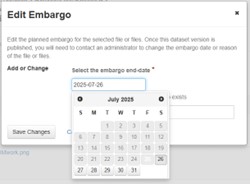
(3) In the CUHK RDR, students can set embargo period for individual files by specifying an embargo end-date. See screenshot below. Note: if they would like to set an indefinite embargo date on their dataset, they can make use of the ‘Restrict(ed) files’ feature in the CUHK RDR.